
AWS Supply Chain
Order Fulfillment Picking UX
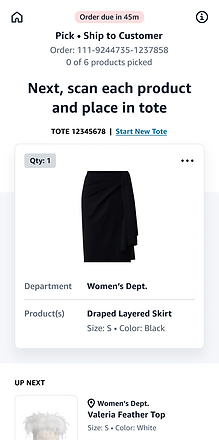
Another key user experience of the Order Fulfillment module that I designed is the associate mobile app used to fulfill orders. The steps they take to complete tasks are determined by the workflow configurations set up in onboarding. These are steps that associates follow many times a day so making it quick, easy and intuitive was crucial. Because the various steps for tasks can be customized and configured many different types of flows needed to be designed for receiving, putaway, picking and more. This was also the first mobile experience for AWS Supply Chain so there was a lot to figure out in terms of aligning with the rest of our app but developing new mobile specific patterns.
Pick to Tote




User Flow
1. User selects a task from the prioritized list.
2. User finds a tote they will be picking the items into and scans it.
3. User is shown the list of items they will be picking.
4. User then scans each item, confirms the quantity and places it in the tote.
5. User follows the same step until all of the items are picked.
6. User moves onto their next task.
Pick to Cart


User Flow
1. User selects a task from the prioritized list. In this scenario it is a multi-order task so they will be using a pick cart.
2. User finds a cart they will be using and scans the cart.
3. User is shown the list of items they will be picking.
4. User scans an item and is shown a visual representation of where to place the item in the pick cart. User places the item.
5. User follows these steps for every order.
6. User moved to next task.
Receiving


User Flow
1. User finds the ASN # on the inbound paperwork and enters it.
2. System then knows what cases the user will be receiving.
3. User scans the first case.
4. User is shown the items in the case and places them in their respective totes.
5. If the case happens to be damaged user can submit an issue.
6. User receives all of the cases and then scans the next ASN.
Putaway


User Flow
1. User will be putting away product from totes they packed in receiving to the store front.
2. User scans the tote they will be putting away.
3. User is given a list of items to putaway and their locations. User walks to each location and confirms the amount they are putting away. (This walk path is optimized based on what they configured in onboarding)
4. The user completes putaway for each item.
5. If they were not able to put everything away they are given a reminder and directed to put the item in the backroom.